It ran for an hour, hit one question — can I force-push?, overwrite this file? — and has been sitting there ever since. Not working. Not failing. Waiting for a human who walked away. LeSearch Mesh puts that question on your wrist the second it lands, and puts your answer back in the real session. Three seconds instead of the rest of the afternoon.
curl -fsSL https://mesh.lesearch.ai/install.sh | sh
This is the loop the app exists for. Everything else is in service of it.
Claude Code, Codex, whatever you run — it hits a permission prompt in a tmux session on your Mac and stops dead. A hook fires the instant it does.
The machine, the session, and the actual question, in a notification you can act on. A question that would force-push or delete gets a red button naming the verb — everything else is a calm Continue.
Tap Continue and Enter lands in the real session. Or dictate a reply and it gets typed in. The agent picks up where it stopped — you never got up.
The comparable tools relay your sessions through their servers. That is the easy way to build this, and it means your terminal output, your prompts and your source code pass through somebody else's machine.
Captured against a live daemon — a fleet with one machine honestly offline, a build streaming into the phone terminal, and the crown-scrollable terminal on the wrist.
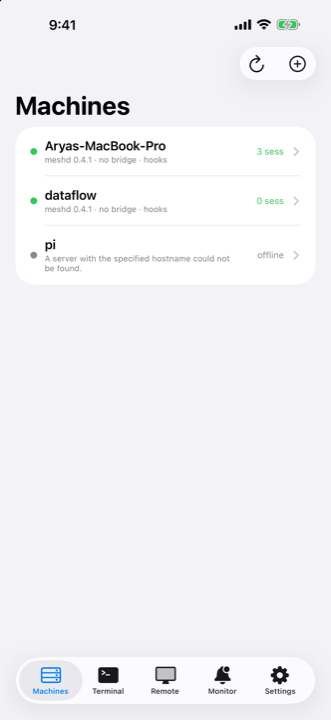
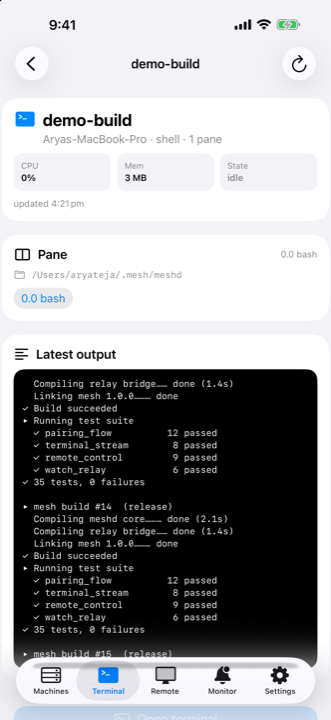
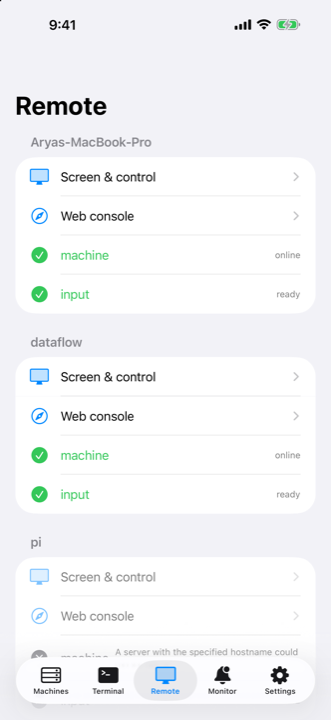
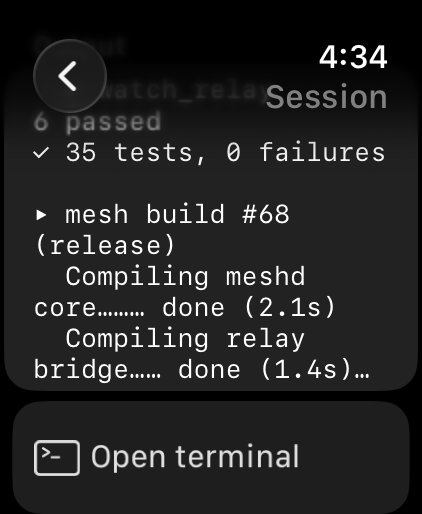
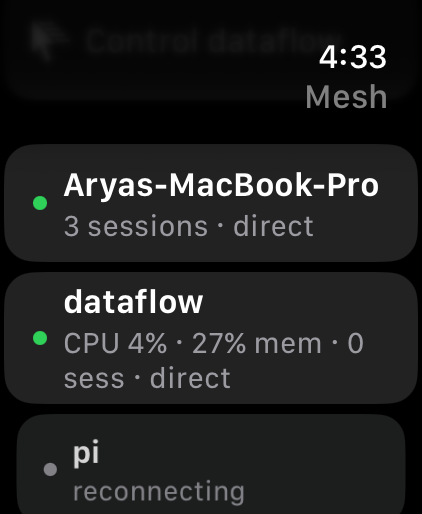
Most tools in this space treat the watch as a notification mirror. Here it is the primary surface, and the phone is the thing that keeps it fed.
How many agents are waiting on you, all day, in every accessory family. When nothing is waiting it shows how much of your mesh is up — and it tells you when the reading has gone stale instead of quietly lying.
Continue, Stop, or dictate a Reply straight from the notification. The reply is typed into the real session on the real machine — and once the task is done, the banner takes itself down.
The one session that actually needs you, live on the Lock Screen and in the Smart Stack — with how much of your fleet is online next to it. Blocked always outranks merely busy.
Crown to scroll, auto-follow at the tail, a key bar for the characters a watch keyboard will not give you, and full VoiceOver.
Drive the Mac itself across multiple displays — trackpad-style pointer with pinch-to-zoom, sticky modifiers so ⌘⇧4 works, paste both ways, and a live screen view — when answering a question is not enough.
CPU, memory, disk, load and top processes for every paired machine. Wake a
sleeping box over LAN from its neighbour. mesh status
shows the whole fleet in one screen.
There is no signup, no dashboard and no server of ours in the path. You install a
small daemon on a machine you own, and your phone pairs with it directly.
Or run mesh setup and let it walk you through
permissions, pairing, and hooks.
Bun + TypeScript, ~3 MB. Registers with launchd or systemd, so it comes back after a reboot. Read it before you run it — the installer is one shell script and the daemon source is public.
curl -fsSL https://mesh.lesearch.ai/install.sh | sh
Prints a QR code and an eight-character code that is good for ten minutes and one use. Scan it with your iPhone's camera. The Mac hands back its own access token and every other machine it already knows about — a fleet of four takes one code.
mesh pair
Registers a hook with Claude Code so a blocked agent reaches your wrist. Merges into your existing hooks, backs up your settings first, and is safe to run twice.
mesh hooks install
An iPhone on iOS 26 or later and, to get the good part, an Apple Watch on watchOS 10 or later. At least one Mac or Linux machine to install the daemon on. The watch app is a companion to the iPhone app, so it installs from the Watch app on your phone, not from the watch itself.
Yes, if your phone and your machine are on the same private network — a Tailscale tailnet is what this was built against, and it is what we use. There is no hole-punching and no relay of ours, so if your phone cannot reach the machine, neither can the app.
Yes: the same installer, the same pairing, the same agent alerts, plus keyboard
and mouse input through xdotool on X11. Screen capture is macOS-only
today, and Wayland input is not supported yet.
Claude Code is wired up by mesh hooks install. Anything else can post
to the daemon's /events endpoint with one curl call, which is how the
hook itself works — so Codex, a CI job, or a shell script can all raise your wrist.
Yes — all of it. The daemon, the mesh CLI, and the iOS + watchOS app
live at LeSearch-AI/mesh, and the
one-line installer at
LeSearch-AI/mesh-install.
The part that runs on your machine is a small dependency-free TypeScript
codebase — about 3,000 lines you can read in a sitting.
Two minutes to set up. Free while it is in beta, and there is no account to create — pairing is a code your own machine prints.
 LeSearch Mesh